BMS & Protection
Sizing Your BMS: Current Ratings and Heat Dissipation
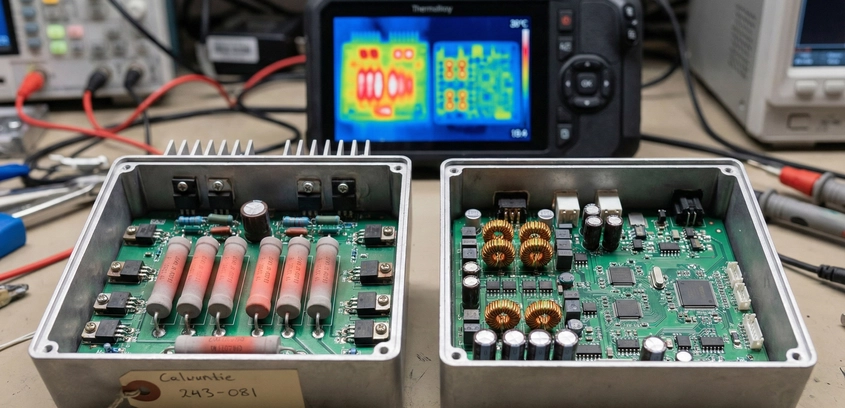
The Choke Point of Your SystemYou have built a battery capable of delivering 100 Amps. You have a motor controller that demands 50 Amps. But if you install a BMS rated for exactly 50 Amps, you have effectively placed a restrictive valve on your fuel line. The Battery Management System (BMS) is the only component in your power path that actively generates heat proportional to the current flowing through it.Choosing the correct current rating is not just about avoiding shutdowns; it is about thermal management. A BMS running at its maximum rated limit gets hot—often exceeding 80°C inside a sealed battery pack. This heat degrades nearby cells, melts insulation, and eventually kills the BMS itself. To build a reliable system, you must understand how ratings work and apply the "Safety Factor."1. Peak vs. Continuous: The Marketing TrapWhen you look at a BMS datasheet on AliExpress or Amazon, you will often see a big bold number: "100A BMS".The Reality: That "100A" figure is often the Peak rating (usually 10 seconds or less). The true Continuous rating might be only 40A or 50A. If you try to pull 100A continuously, the MOSFETs will reach their thermal runaway temperature and fail (often failing "Closed," meaning protection is lost, or "Open," killing power).Rule #1: Always dig into the datasheet to find the "Continuous Discharge Current." If it is not listed, assume the bold number is Peak and divide by 2.2. The Physics of Heat: $I^2R$ LossesWhy does a BMS get hot? Because of the MOSFETs (Metal-Oxide-Semiconductor Field-Effect Transistors). A MOSFET is a switch. Even when it is fully "On," it has a tiny internal resistance called $R_{ds(on)}$.Let's do the math: A cheap BMS might have a total resistance of 2 milliohms (0.002 Ω). If you push 50 Amps through it: $Power (Heat) = 50^2 imes 0.002 = 2500 imes 0.002 = mathbf{5 Watts}$. 5 Watts is manageable. The BMS will get warm (maybe 40°C).Now, push 100 Amps (doubling the current): $Power (Heat) = 100^2 imes 0.002 = 10000 imes 0.002 = mathbf{20 Watts}$. 20 Watts is a soldering iron. Inside a shrink-wrapped battery with no airflow, this BMS will hit 100°C in minutes and shut down.The Lesson: Heat increases with the square of the current. This is why you cannot simply run a BMS at its limit. You need exponential headroom.3. The "Derating" Rule of ThumbBecause most budget BMS units use cheaper MOSFETs with higher resistance, experienced builders use a strict derating multiplier.The 2X Rule: Buy a BMS rated for at least Double your expected continuous load.Load: 30A E-Bike Controller. Buy: 60A BMS.Load: 100A Home Inverter. Buy: 200A BMS.By using a 60A BMS for a 30A load, you are spreading the current across twice as many MOSFETs. This lowers the resistance by half, which cuts the heat generation significantly. The BMS will run cool to the touch, improving efficiency and longevity.4. Matching the Controller, Not the MotorA common mistake is sizing the BMS based on the motor's Wattage. "I have a 1000W motor, so I need 20 Amps at 48V." Wrong. Motors are rated for continuous output power. But during acceleration (hills, starts), the Controller decides how much power to pull. A "1000W" kit often comes with a 30A or 35A controller. If you size your BMS for 20A, but your controller tries to pull 35A on a hill, the BMS will trigger Over-Current Protection (OCP) and cut power instantly. You will stop dead in the middle of the hill.Step 1: Look at the label on your Motor Controller. Step 2: Find the "Max Current" or "Peak Current" (e.g., 35A). Step 3: Buy a BMS rated for at least that Peak Current continuously (e.g., 40A or 50A) to prevent nuisance tripping.5. The Physical Size FactorAmpacity requires physical mass. If you see a "100A BMS" that is the size of a credit card and weighs 50 grams, it is lying. To handle 100A, you need thick copper traces on the PCB, a large aluminum heatsink, and heavy-gauge wires (8 AWG or 6 AWG). A real 100A BMS (like a Daly or JK) is heavy and bulky. If space is tight in your build (e.g., inside a bike frame), you may be forced to use a lower-rated BMS. In this case, you must reprogram your controller to limit the current draw to match the BMS.6. Smart BMS AdvantageIf you are unsure about your loads, buy a Smart BMS. Most Smart BMS units allow you to adjust the Over-Current protection. Example: You buy a 100A JK BMS. You can set the trip limit to 150A, 80A, or even 20A. This flexibility allows you to fine-tune the protection to match your specific wiring and fuses, ensuring the BMS protects the weakest link in your chain.SummaryA BMS is cheaper than a fire. Saving $10 by buying a barely-sufficient BMS is false economy. Oversizing your BMS ensures it acts as a silent, cool, invisible guardian rather than a bottleneck that cuts power every time you try to accelerate. When in doubt, go bigger.