Tools & Equipment
Using Thermal Cameras for Diagnostic Checks
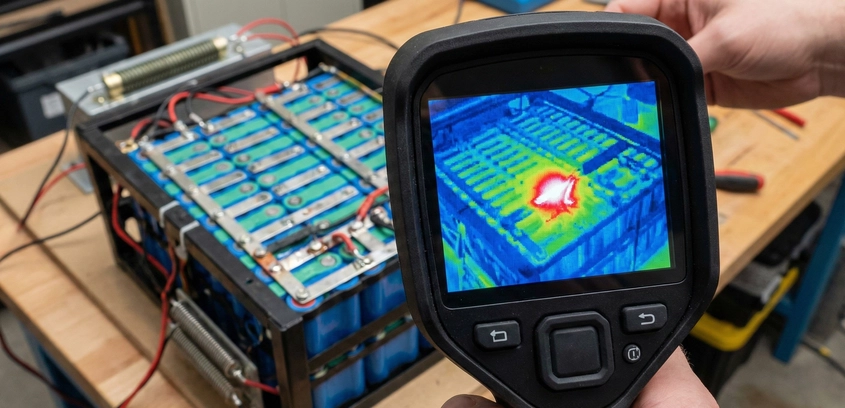
Seeing the Invisible HeatIn the world of battery engineering, heat is the most reliable narrator of failure. Long before a battery pack catches fire, and long before a BMS trips an over-temperature alarm, the physics of resistance provides a warning in the form of infrared radiation. A high-resistance spot weld, a loose busbar bolt, or a cell with an internal short will all generate localized heat that is completely invisible to the human eye. To the uninitiated builder, the pack looks perfect. To the engineer with a thermal camera, the pack is screaming for help.Thermal imaging (thermography) has shifted from being an elite industrial luxury to an essential tool for the DIY battery builder. With the advent of smartphone-attachable modules, we now have the power to perform non-destructive testing (NDT) on every pack we build. In this guide, we will analyze the physics of $I^2R$ heat generation and provide a professional protocol for using thermal cameras to ensure battery safety and longevity.1. The Physics of the "Hot Spot"Why do certain parts of a battery pack get hotter than others? It all comes back to Ohm’s Law and Joule Heating. Every electrical connection has some amount of resistance ($R$). When current ($I$) flows through that resistance, energy is converted into heat ($P$).The Formula: $P = I^2 imes R$.In a high-power e-bike battery pulling 50 Amps, a "minor" resistance of just 0.01 Ohms (10 milliohms) at a single spot weld will generate: $50^2 imes 0.01 = mathbf{25 Watts}$ of heat at a point smaller than a pinhead. This heat cannot dissipate fast enough. Within seconds, that point will reach temperatures exceeding 100°C, melting the cell's PVC wrap and potentially triggering thermal runaway. A thermal camera detects this specific infrared wavelength and translates it into a visual map, making that 25-watt heater glow like a beacon against the cool background of the rest of the pack.2. The Dynamic Load Test ProtocolA thermal camera is useless if the battery is just sitting on a shelf. Without current flow ($I$), there is no heat generation ($P$). To find defects, you must perform a Dynamic Load Test.Step 1: The Baseline ScanBefore applying a load, scan the battery at rest. Every cell should be at ambient room temperature. If you see a cell that is 2-3°C warmer than the others while sitting idle, it is a "Leaker"—a cell with high self-discharge that is converting its internal chemical energy into heat. This cell must be removed immediately.Step 2: Applying the LoadConnect the battery to an Electronic Load or the actual motor it is designed to run. Pull roughly 50% of the pack's maximum rated current. For a 30A e-bike battery, pull 15A.Step 3: The 5-Minute WindowHeat takes time to conduct through materials but infrared radiation is instant. Start scanning immediately. Look for "Asymmetric Heating." In a perfect pack, all cells and all nickel strips should warm up at exactly the same rate. Any point that jumps ahead of the others is a failure point.3. Identifying Specific DefectsA thermal camera is a diagnostic stethoscope. Here is how to interpret what you see:Glowing Spot Welds: If a single weld point is significantly hotter than the others on the same strip, the weld is "Cold" or "Weak." There is poor molecular fusion, creating high contact resistance. This weld will eventually arc and fail. (See our Spot Welder Comparison for how to fix this).Hot BMS MOSFETs: It is normal for a BMS to get warm (up to 50°C). However, if one corner of the BMS is hitting 80°C while the other is cool, you have an unbalanced current path or a failing MOSFET. This usually indicates the BMS is undersized for the load.Busbar Gradient: In large Powerwalls, look at the bolts. A hot bolt indicates insufficient torque. The mechanical pressure is too low to overcome the oxide layer on the metal, creating resistance."The Hot Cell": If one cell in the middle of a parallel group is 10°C hotter than its neighbors, it has a higher Internal Resistance (IR). It is struggling to keep up with the current demand and is literally cooking itself.4. Hardware Comparison: FLIR vs. Seek vs. TopdonIn 2026, you don't need a $5,000 handheld Fluke. Smartphone modules are the way to go.FLIR One Edge / Gen 3The industry leader. FLIR uses "MSX" technology, which overlays a visual outline on top of the thermal image. Pros: Excellent software, very easy to identify exactly which cell is hot. Cons: Low thermal resolution (often only 80x60 or 160x120 pixels) for the price.Seek Thermal CompactPros: High native resolution (206x156) for a lower price than FLIR. Excellent for spotting tiny nickel strip defects. Cons: No MSX-style overlay; the images can look like "blobs" if you don't know what you are looking at.Topdon TC001 / Infiray P2 ProThe current "Engineer's Choice." These Chinese-made modules offer massive 256x192 resolution and incredibly high refresh rates (25Hz). Why refresh rate matters: When you are scanning a vibrating e-bike or moving your hand over a pack, a 9Hz camera (standard FLIR) looks choppy. A 25Hz camera feels like a real-time video, making it much easier to track fast-rising heat spikes.5. Limitations and False Positives: EmissivityA thermal camera can lie to you if you don't understand Emissivity. This is a material's ability to emit infrared energy. Shiny metals (like brand new polished nickel strips or aluminum busbars) have very low emissivity. They act like mirrors for infrared. You might see a "hot spot" that is actually just a reflection of your own body heat or a light bulb in the room. The Fix: Put a small piece of black electrical tape or a dab of matte black paint on the busbars. This gives the camera a consistent surface to measure. Never trust a thermal reading from a bare, shiny metal surface.SummaryA thermal camera is not just a gadget; it is an insurance policy. By integrating a 5-minute thermal load test into your quality control process, you catch the "hidden shunts" and "weak nuggets" that lead to catastrophic house fires. If you are building high-energy battery packs for yourself or others, seeing the invisible heat is the only way to truly guarantee safety.